You’ve landed on Bloxorz. You’ve tipped the block off the edge — again. We get it. This deceptively simple logic puzzle has been breaking brains since Flash was king. This guide covers everything: mechanics, Bloxorz unblocked access, level codes, and a full breakdown of the notorious Level 11.
Why Bloxorz Lives on Coolmath Games and Math Playground
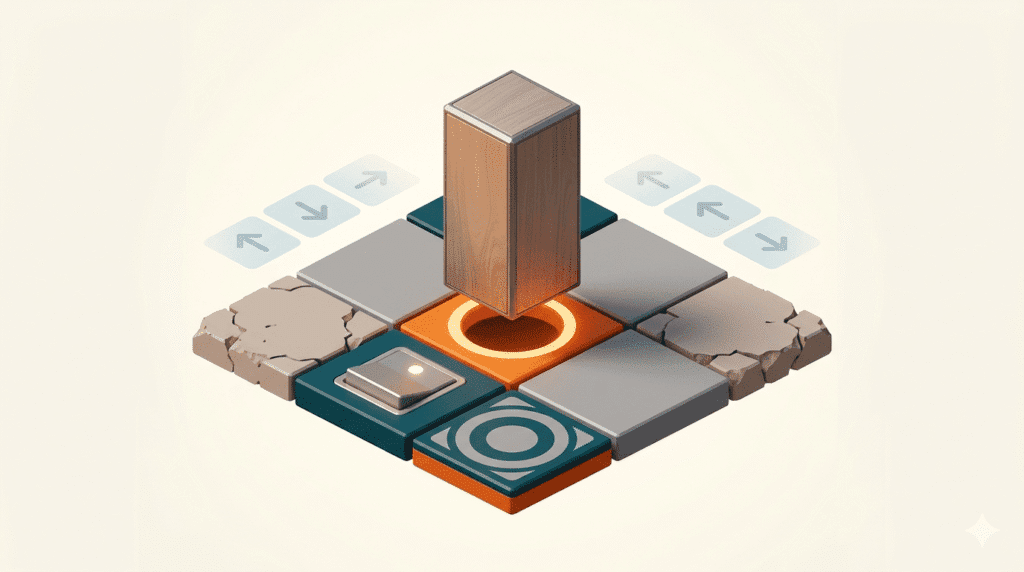
Bloxorz is one of those rare browser puzzles that genuinely earns its place on educational platforms. It was created by Damien Clarke and first published on Miniclip around 2007 — back when Flash games were the internet’s unofficial curriculum. The premise: roll a 1×1×2 block across floating tiles and drop it upright into the goal hole. Dead simple. Maddening in practice.
Coolmath Games Bloxorz became the go-to version because Coolmath Games positioned itself as a school-friendly gaming hub. Teachers tolerated it. Students adored it. The platform’s reputation for logic puzzles and math-adjacent games made Bloxorz a natural fit — it genuinely trains spatial reasoning and sequential thinking.
Math Playground Bloxorz followed a similar logic. Math Playground curates games that build problem-solving skills, and Bloxorz checks every box: pattern recognition, multi-step planning, consequence-based decision making. No violence, no ads chasing you around the screen. Just pure, aggravating geometry.
Fun fact: Bloxorz uses tile-based physics that mirror real spatial math concepts — the same rotational logic that appears in geometry formulas used in actual game development. Your teacher wasn’t wrong.
Both platforms survived the death of Adobe Flash by migrating their libraries to HTML5 and WebGL — the browser technology that now renders games natively without plugins. Bloxorz made the jump, which is why you can still play it today with zero installation required.
Playing Bloxorz Unblocked at School or Work
School and workplace networks often block gaming sites. It’s annoying. It’s also pretty easy to work around — legally and safely — using browser-based access methods.
Why Bloxorz Gets Blocked
Most network filters use domain-category blacklists. Sites tagged as “gaming” get blocked regardless of content. Coolmath Games and Math Playground sometimes slip through because they’re categorized as “education,” but not always.
The Best Ways to Access Bloxorz Unblocked
Method 1 — Educational platforms: Try Math Playground directly. Many schools whitelist it because it’s a known educational resource. Same goes for Coolmath Games. These are your cleanest options.
Method 2 — Browser-based mirror sites: There are dozens of unblocked game sites designed for school use. Look for ones that host Bloxorz as an HTML5 embed, not a Flash download. HTML5 versions run in any modern browser tab — Chrome, Firefox, Edge — with no extra software.
Method 3 — Unblocked game hubs: Platforms like Unblocked Games 6x and Unblocked Games G host curated libraries. Many include Bloxorz. Check that the version you find uses WebGL or Canvas rendering — that’s your sign it’ll work smoothly without Flash.
Quick tip: Avoid sites that ask you to download anything. Legitimate Bloxorz unblocked versions run entirely in your browser. If a site pushes a .exe or browser extension, leave immediately. Real browser-based play needs nothing installed.
If you need more unblocked browser game options beyond Bloxorz, there’s a solid collection worth bookmarking — especially for study breaks.
Mastering Bloxorz: Physics, Strategy, and Tile Types
Bloxorz looks like a simple tile-pusher. It isn’t. The block’s orientation — standing upright versus lying flat — changes everything about what moves are safe or even legal. Treat every move as a chain reaction, not an individual action.
The Core Physics Rule
Your block exists in one of three states at any moment: standing upright (tall), lying flat east-west, or lying flat north-south. The goal hole only accepts the block when it’s perfectly upright. This means your final move is always predetermined — you must approach the hole from a direction that leaves you vertical.
Every Tile Type, Explained
Standard floor. Supports the block in any position. Your safe zone.
Crumbles if the block stands upright on it. Only safe when the block is horizontal.
Activates bridges or toggles tile sections. “X” switches require upright block; “(” switches need horizontal.
Splits or moves your block. Some split the block into two 1×1 pieces you control separately.
Toggled by any block contact — upright or flat. Usually easier to activate than hard switches.
Strategic Principles That Actually Help
Count your moves, not your mistakes. Before touching the keyboard, scan the entire board. Identify the hole’s approach direction, then work backwards. Where do you need to be two moves before the end? Three?
Fragile tiles are tempo tools. Don’t fear them — use them. They limit where you can stand upright, which actually narrows your decision tree and helps eliminate wrong paths faster.
Switches first, path second. If a bridge needs activating, build that into your route early. Missing a switch activation usually means restarting, not rerouting.
Bloxorz Level 11 — Step-by-Step Walkthrough
Level 11 trips up a shocking number of players. It’s the first level that truly forces you to use a switch sequence in combination with fragile tiles — neither mechanic alone is new at this point, but together they require precise ordering.
Level 11 code: 999919 — paste this into the passcode screen to jump straight here.
What Makes Level 11 Hard
The board has a fragile section between you and the switch. If you stand upright on it, it collapses. You must reach the switch horizontally — which means your approach angle matters before you even touch the fragile tiles.
If your block falls before step 5, you likely approached the fragile section upright in step 1. Restart and focus on staying flat through that middle zone.
Complete Bloxorz Level Codes — All 33 Levels
Every level in Bloxorz has a passcode. Enter it from the main menu to skip directly to any stage. These are the official codes for all 33 levels:
| Level | Passcode | Notes |
|---|---|---|
| 1 | 780464 | Tutorial / starting level |
| 2 | 290299 | Introduces basic movement |
| 3 | 918660 | First corner navigation |
| 4 | 446091 | Introduces fragile tiles |
| 5 | 520967 | Switch mechanics introduced |
| 6 | 699727 | First hard switch (X-switch) |
| 7 | 082749 | Teleport tile debut |
| 8 | 169237 | Split block mechanic |
| 9 | 810738 | Combined fragile + switch |
| 10 | 769448 | Timing-sensitive switches |
| 11 | 999919 | Bridge + fragile combo Popular |
| 12 | 376879 | Multi-switch board |
| 13 | 611301 | Teleport sequence puzzle |
| 14 | 197893 | Narrow path navigation |
| 15 | 895694 | Split block + switches |
| 16 | 024147 | Complex bridge toggling |
| 17 | 073951 | Multi-level bridge routing |
| 18 | 368621 | Teleport chains Hard |
| 19 | 349781 | Fragile maze |
| 20 | 691859 | Switch ordering puzzle |
| 21 | 331742 | Split block precision |
| 22 | 998391 | Narrow + fragile + switch |
| 23 | 261483 | Double teleport Hard |
| 24 | 734907 | Long sequential route |
| 25 | 495788 | Inverted bridge order |
| 26 | 985035 | Dense fragile layout |
| 27 | 133780 | Multi-split routing |
| 28 | 444011 | Complex multi-switch Hard |
| 29 | 971716 | Precision fragile path |
| 30 | 111899 | All mechanics combined |
| 31 | 867483 | Near-endgame difficulty |
| 32 | 224689 | Penultimate challenge |
| 33 | 031031 | Final level Hardest |
These codes function like save states — enter any of them and the game drops you straight into that stage. No progress lost, no replaying earlier levels. If you enjoy collecting game codes, check out resources for Cookie Run Kingdom codes and Zombie Catchers codes for similar shortcut systems in other games.
Bloxorz FAQ — Quick Answers
Bloxorz doesn’t have a built-in save system in most browser versions. The solution is the passcode system — every level has a unique code (see the full table above). Write down or bookmark the code for the level you’re on. Next time you open the game, enter that code from the main screen and you’re right back where you left off. No account needed.
Yes, completely free. Bloxorz has always been a browser-based, no-cost game. Coolmath Games, Math Playground, and most unblocked game sites host it without paywalls, subscriptions, or in-game purchases. There’s nothing to buy, no premium version, no “extra levels” behind a payment. Just the 33 levels, free, in your browser.
Community consensus consistently points to Levels 18, 23, 28, and 33 as the toughest. Level 18 introduces teleport chains that feel counterintuitive. Level 23 requires double teleport routing. Level 28 stacks multiple switch conditions that must be triggered in a specific order. Level 33 — the final level — combines everything and demands near-perfect execution. Levels 11 and 12 are also notorious for tripping up mid-game players due to the fragile-plus-switch combination.