You’re just trying to Google something. Then you see it: a tiny half-moon icon sitting right there in the search bar. You click it. Twenty minutes later, you’ve lost eleven times and you’re genuinely angry at a browser game. Welcome to “Rise of the Half Moon” — Google’s sneakiest doodle yet.
This isn’t another cute little Google mini-game you beat in two tries and forget. The Moon Game has layers. It has a deceptive difficulty curve. And once people figured out there’s actual strategy behind the card-matching mechanics, the internet collectively lost its mind trying to crack it. We did too. Here’s everything we found.
🌗 How does the Moon Game actually work?
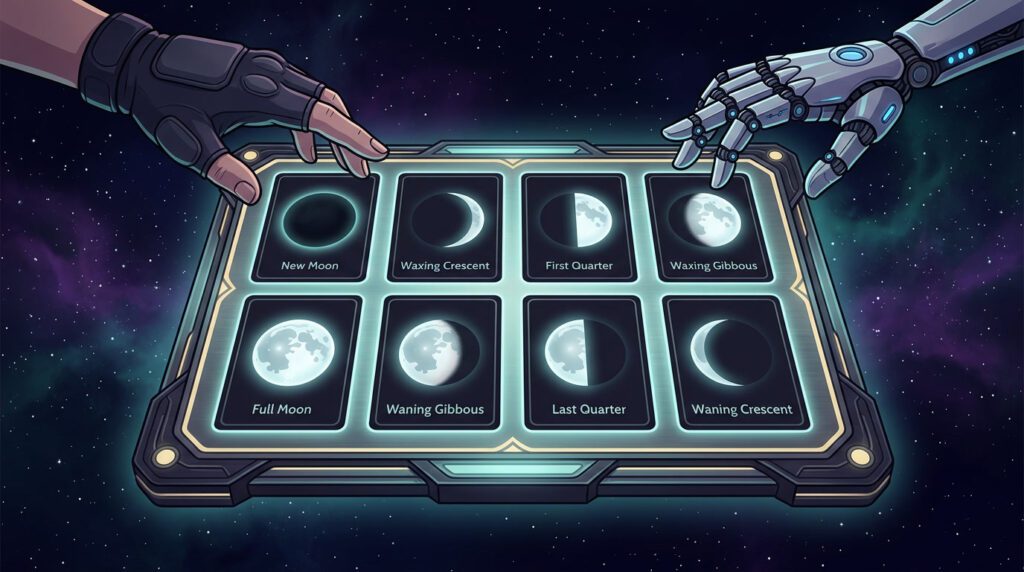
At its core, “Rise of the Half Moon” is a card-matching game — but calling it that undersells it completely. Think of it like a Clash Royale card system meets memory puzzle meets lunar phase quiz all at once.
Each card you flip displays a lunar phase. Your job is to find its pair. Simple, right? Not even close.
The Half Moon challenge explained
The Half Moon is where the real challenge lives. The game features both the First Quarter (🌓) and Last Quarter (🌗) phases — and they look almost identical at a glance. Left-lit or right-lit? One pixel of difference can break your streak. Most players misidentify these two more than any other pair in the entire deck.
🏆 How to beat the AI — actual strategy
Most players approach this like a pure memory game and get stomped. The AI isn’t just fast — it’s built to punish reactive play. You need a system. Here’s ours.
- 1 Scan before you click anything. The first two seconds after the board appears are gold. Study card positions before making your first flip. Most players rush. Don’t be most players.
- 2 Prioritize the confusable pairs first. Go for Half Moon cards (First Quarter and Last Quarter) early — while you still have a fresh mental image of where each one sits. Leaving them for late-game is asking for mistakes.
- 3 Use a grid system in your head. Mentally label the board in rows: top-left, top-right, middle-left, etc. Don’t just remember “it was somewhere over there.” Exact positions win this game. This is the same discipline that makes players great at memory-based puzzle games in general.
- 4 Let the AI flip first on unfamiliar rounds. If you’re unsure where a card is, sometimes the AI’s move reveals it for you. Patience is a move.
- 5 Never guess on Half Moons. If you’re not 100% sure which side the light is on, don’t flip. A wrong guess resets your position and feeds the AI a free turn.
- 6 New Moon and Full Moon are freebies. All black or all white — these are the easiest matches. Chain them quickly to build early momentum before the hard cards remain.
Which cards to prioritize
| Card | Phase | Difficulty | Priority | Why it matters |
|---|---|---|---|---|
| 🌑 | New Moon | Very Easy | Match first | Fully black — zero confusion. Grab it immediately. |
| 🌕 | Full Moon | Very Easy | Match first | Fully white — instant recognition. Same as New Moon. |
| 🌒 | Waxing Crescent | Easy | Match early | Thin sliver on the right side. Distinctive shape. |
| 🌘 | Waning Crescent | Easy | Match early | Thin sliver on the left. Can mirror Waxing — check the side. |
| 🌔 | Waxing Gibbous | Medium | Match mid-game | Mostly lit, small dark shadow right side. Easy to confuse with Waning Gibbous. |
| 🌖 | Waning Gibbous | Medium | Match mid-game | Mostly lit, small dark shadow left side. Mirror of Waxing Gibbous. |
| 🌓 | First Quarter | Hard | Tackle carefully | Half lit (right). Most-confused card in the game. Nail its position early. |
| 🌗 | Last Quarter | Hard | Tackle carefully | Half lit (left). The true “half moon” — source of most losses. Treat with respect. |
🎮 Why this doodle is quietly impressive
Google didn’t just ship a memory game with a space skin. The Moon Game has genuine UX craft behind it — and anyone who works in game development will spot it immediately.
Studios that focus on polished browser and mobile experiences — like eJaw or Heronbyte — understand this principle deeply. The production value in “simple” browser games is what separates forgettable from viral. Google nailed the feedback loop: fast match animations, satisfying sound design, just enough competitive pressure from the AI opponent. It hits all the marks of a well-crafted casual game.
The game also does something smart with its learning curve — it teaches lunar phases passively. You don’t feel like you’re being educated. You feel like you’re competing. That’s excellent educational UX, and it’s rare even in dedicated learning apps.
🌕 Other Google Moon hidden gems worth knowing
The Moon Game isn’t the only lunar Easter egg Google has hidden in plain sight. While it’s the most playable one, here’s the quick rundown of what else is out there:
The verdict: is it the best Google Doodle ever?
That’s a spicy claim. The Garden Gnome Doodle has its fans. The Halloween cat game was beloved. But “Rise of the Half Moon” does something most doodles don’t: it has replayability.
You don’t beat it once and move on. You beat it and immediately want to beat it faster, cleaner, with fewer mistakes. That’s the mark of a genuinely good game — not a one-and-done Easter egg. The same addictive quality shows up in great puzzle game hybrids and word games like Connections.