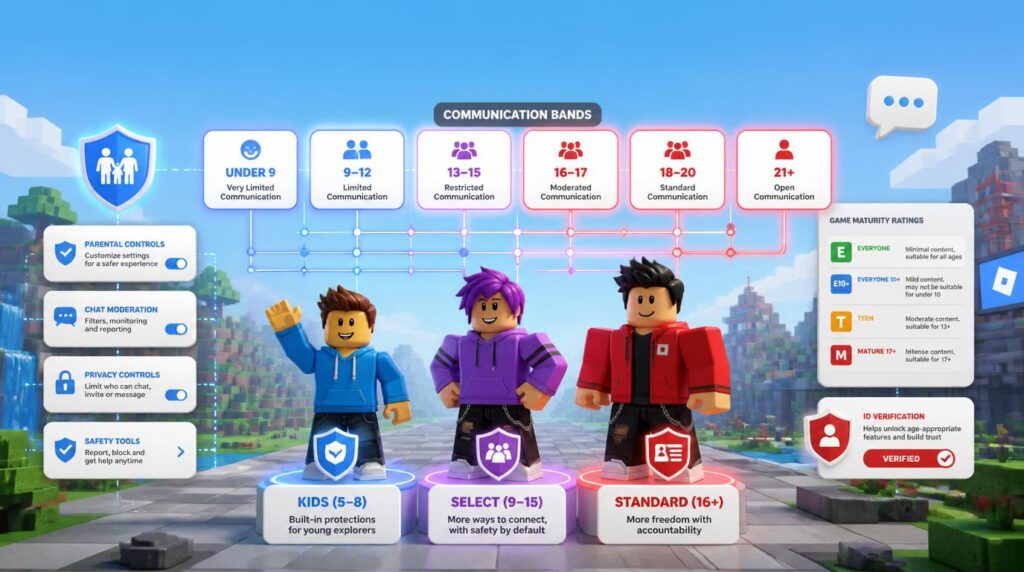
Roblox spent years being described as an “all-ages platform” with one shared chat box for a five-year-old and a grown adult. That’s no longer how it works. Following years of safety pressure and legal scrutiny, Roblox rebuilt its entire user base around Roblox age groups: mandatory age checks, tiered account types, and a six-band chat system that decides exactly who can talk to whom.
The shift didn’t happen overnight. Roblox age verification for chat became mandatory globally in stages through late 2025 and into 2026, using facial age estimation technology to sort every user into an account type and a communication bracket. For parents, that means far more visibility and control. For players, it means access to features — from basic character customization to full chat — now depends heavily on which bracket their estimated or verified age places them in.
The 3 Main Roblox Account Types
Every user lands in one of three account tiers once age estimation or ID verification runs, each with a different default catalog and default chat setting.
Roblox Kids Account
- Blue-tinted app interface that visually signals a child-safe account, distinct from the standard experience.
- Catalog limited to games rated Minimal or Mild maturity only.
- Chat is off by default and stays off unless a linked parent explicitly grants permission.
- Social hangout spaces and free-form drawing/text tools are excluded from this tier automatically.
Roblox Select Account
- Access expands to include Moderate rated games alongside Minimal and Mild content.
- Text and voice chat are gradually introduced rather than switched on all at once — younger users in this band see more filtering than teens closer to 15.
- Autonomy shifts progressively from parent-controlled settings toward more independent account management as the child approaches 13.
Standard Roblox Account
- Full platform autonomy with no default content ceiling.
- Access to Restricted content, including 17+ games on Roblox and 18+ experiences, once age verification confirms eligibility.
- Chat, trading, and social features run unrestricted by default, though optional parental monitoring can still be linked if a family chooses it.
The 6 Roblox Age Brackets for Communication & Chat
Account type controls what content a user can open. A separate, more granular system — Roblox age brackets chat rules — controls who that user can actually talk to. Every age-checked account is sorted into one of six communication bands:
Standard chat generally only connects users within their own band and one adjacent band — a 13–15 user can chat with 9–12 and 16–17, but not with 18–20 or 21+.
The purpose is straightforward: minimize contact between adults and minors who don’t already know each other in real life. That’s also why the system needed an escape hatch for actual families and friend groups who happen to span different bands.
Content Maturity Ratings & Game Restrictions
Every experience on Roblox carries a maturity label that determines which account types can even see it in search or catalog results, separate from the chat bracket a player belongs to.
| Age Category | Allowed Maturity Rating | Chat Default | Parental Override Required? |
|---|---|---|---|
| Roblox Kids (5–8) | Minimal, Mild | Off | Yes — required to enable any chat |
| Roblox Select, younger (9–12) | Minimal, Mild, Moderate | Partial / filtered | Recommended, not always required |
| Roblox Select, teen (13–15) | Minimal, Mild, Moderate | On, filtered | Optional |
| Standard Roblox (16+) | Includes Restricted (17+/18+) once verified | On, unfiltered | No |
Unverified accounts sit outside this table entirely: without completing an age check, chat features stay disabled by default across the platform, and Restricted 17+/18+ titles remain inaccessible no matter how old the account claims to be. Age verification isn’t optional friction — it’s the gate itself. Games leaning into a more mature audience, similar to the tone found across Roblox’s horror game catalog, are exactly the kind of content that gets held behind that Restricted-rating wall until verification clears.
Essential Parental Controls for Every Age Bracket
Every Roblox Kids and Select account can be linked to a Connected Parent, unlocking a dashboard that governs far more than just chat access — a companion piece to the broader questions covered in our guide to explaining online games to parents.
- Link accounts first. From the parent’s own Roblox account, use the Parental Controls hub to send a linking request to the child’s account and confirm it from the child’s device.
- Set spending notifications and limits. Enable purchase alerts for every Robux transaction, or cap monthly spending outright so a child’s account can’t make purchases above a set threshold without approval.
- Configure screen-time restrictions. Set daily play-time limits and designated allowed hours directly from the parent dashboard; the child’s session ends automatically once the limit is reached.
- Review and adjust the age estimate. If facial age estimation misjudges a child’s age, parents can correct it once through the linked account rather than relying solely on the automated result.
- Monitor allowed and blocked experiences. Build an explicit allow-list or block-list of specific games, independent of the account’s default maturity ceiling, for tighter control over exactly what a child can open.
- Manage chat and Trusted Connections manually. Approve or revoke chat access, and review which Trusted Connections have been added, at any time from the same dashboard.
The Bottom Line
Roblox’s tiered account system — Kids, Select, and Standard — combined with the six-band chat structure, represents the most significant restructuring of the platform’s safety architecture to date. For families, the practical takeaway is simple: link accounts through Parental Controls early, confirm the age estimate is accurate, and treat Trusted Connections as the deliberate exception it is, not a workaround to disable. The system is stricter than the old one-size-fits-all chat box, but it’s also far more transparent about exactly which age is talking to which.