The world of retro game consoles has gone from a niche AliExpress gamble to a crowded, genuinely competitive market — new SigmaStar and Allwinner boards ship almost every quarter, and it’s fair to wonder if a device that first launched years ago can still hold its ground.
Here’s the direct answer: the Miyoo Mini Plus is still one of the best budget retro handhelds you can buy, but only if you fix three things it doesn’t do well out of the box — and this guide shows you exactly how.
Below, we break down the hardware and ergonomics, walk through a complete OnionOS installation guide, set realistic expectations for PS1 emulation performance and beyond, and run a head-to-head retro gaming handheld comparison against the Anbernic RG35XX Plus and the TrimUI Smart Pro — so you can decide if the Miyoo Mini Plus still deserves a spot in your pocket.
Hardware & Ergonomics: What You’re Actually Holding
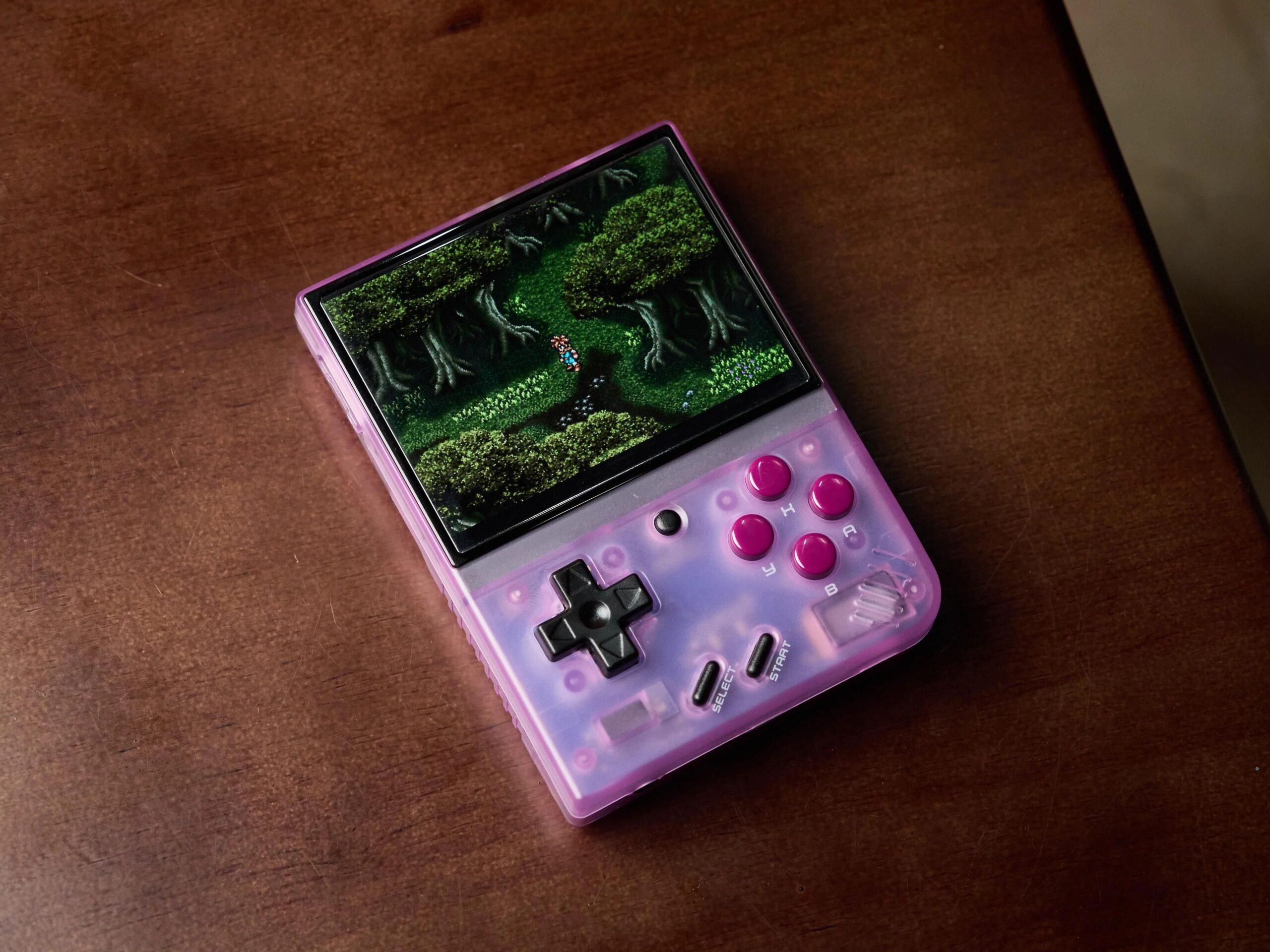
The Miyoo Mini Plus keeps the compact Game Boy form factor that made the original Mini a cult favorite, but stretches the shell just enough to fit a larger screen without losing the pocketability that competitors like the RG35XX often sacrifice. At roughly the size of a stack of playing cards, it disappears into a jacket pocket in a way that 4-inch-plus handhelds simply can’t.
The 3.5-inch IPS Display
The headline upgrade over the original Mini is the 3.5-inch IPS display running at 640×480. That resolution matters more than the size does: it maps cleanly onto 4:3 systems like the SNES, Genesis, and PS1 using integer scaling, so pixel art renders with crisp, even edges instead of the shimmering artifacts you get on panels with awkward aspect ratios. Color accuracy is noticeably better than the TN panels found in older budget handhelds, with wide viewing angles and no visible ghosting during fast-scrolling platformers.
Buttons, D-Pad, and Triggers
Miyoo’s rubber-dome face buttons have a short, tactile throw that fighting-game players will appreciate for consistent double-taps, and the D-pad — a genuine strong point of this handheld — has almost no dead zone in diagonals, which matters more than most reviews admit for platformers that rely on precise 8-way movement. The rear triggers are flat and a bit shallow compared to console-style controllers, which is the one ergonomic compromise of keeping the shell this small.
If your thumb tends to ride the D-pad’s edges, nudge the in-game deadzone setting up by 5–10% inside OnionOS’s controller config. It removes the rare diagonal misfire without making the pad feel numb.
Battery, Thermals, and Wi-Fi
The 3000mAh battery delivers a realistic 4–6 hours of mixed play in our testing — closer to 4 hours running demanding PS1 titles at full clock speed, and closer to 6 hours on 8-bit and 16-bit systems that barely tax the chip. Sustained sessions don’t produce uncomfortable heat; the SigmaStar SSD202D runs cool enough that thermal throttling isn’t something you’ll notice in normal use. Built-in Wi-Fi 4 is reliable for local downloads and firmware updates, though its range is modest compared to dual-band chips in pricier handhelds.
The Day-One Setup: Fixes You Shouldn’t Skip
Every Miyoo Mini Plus ships with a small, generic microSD card, and this is the single most common source of buyer disappointment. It’s not a hardware flaw in the console itself — it’s a storage problem you can solve in ten minutes.
- Replace the stock microSD card first. The bundled card is slow and prone to failure under repeated writes. microSD card corruption is the number one cause of “my save files disappeared” complaints, and it almost always traces back to the stock card, not the firmware. Swap in a reputable A1-rated card (SanDisk or Samsung, 64GB–128GB) before you load a single ROM.
- Follow a proper OnionOS installation guide. Download the latest OnionOS release, format your new card to FAT32, and use the official flashing tool to write the image. On first boot, run through the desktop setup wizard, enable the package manager so you can add themes and cores later, and confirm the Game Switcher function (a long-press shortcut that suspends your current game and returns to the menu without losing state) is active — it’s the feature that makes the Mini Plus feel far more modern than its price suggests.
- Configure auto-save states. Inside OnionOS, turn on save-state-on-suspend so every game you exit through the Game Switcher resumes exactly where you left off, even across power-offs.
- Connect Wi-Fi and set up RetroAchievements and Netplay. Once you’re online, OTA updates keep OnionOS current, RetroAchievements unlocks trophy-style progress tracking across supported cores, and Netplay lets you play select titles online or locally with friends running compatible builds.
Realistic Emulation Limits: What the Miyoo Mini Plus Can (and Can’t) Do
The Miyoo Mini Plus runs on a SigmaStar SSD202D chip paired with 128MB of RAM — modest by modern standards, but more than enough for its intended generation range. Understanding where that ceiling sits is the difference between a satisfying purchase and a frustrating one.
| System | Performance | Frame Rate | Notes |
|---|---|---|---|
| NES / SNES / Genesis / GBC | Excellent | 60fps, no drops | Full speed, negligible input latency |
| Game Boy Advance | Excellent | 60fps | Runs at native speed across the whole library |
| Nintendo DS (Drastic) | Good | ~55–60fps | Dual-screen workaround shortcut squeezes both screens into the 4:3 panel; if you’d rather play natively, a 3DS is still the more comfortable option |
| PS1 — light titles | Excellent | Locked 60fps | e.g. Castlevania: Symphony of the Night runs flawlessly |
| PS1 — demanding titles | Good, with tuning | 50–60fps | e.g. Tekken 3 needs frameskip/bios tweaks for a fully stable frame rate |
| N64 / Dreamcast / PSP | Not viable | Unplayable | Exceeds the SSD202D’s compute and RAM budget |
Overall PS1 emulation performance on the Miyoo Mini Plus is genuinely strong for 2D and moderately complex 3D titles, and this is where a curated set like Done Set 2 pays off — pre-verified, correctly-named ROM collections avoid the bad dumps that cause random slowdown people mistakenly blame on the hardware. Where PS1 emulation performance drops off is in texture-heavy 3D fighters and racers with large draw distances; those need per-game tuning rather than being unplayable outright. N64, Dreamcast, and PSP are a different story: their 3D pipelines and RAM requirements sit well beyond what the 128MB SigmaStar SSD202D platform can push, and no amount of overclocking closes that gap. If those systems matter to you, that’s the clearest signal to look at higher-tier hardware instead.
Expert TipBefore assuming a PS1 game is “too much” for the Mini Plus, check whether you’re running a bad or overdumped ROM. Swapping to a clean, verified image from a curated set like Done Set 2 fixes more perceived performance issues than any BIOS or core setting does.
Retro Gaming Handheld Comparison: Miyoo Mini Plus vs. the Competition
No retro gaming handheld comparison is complete without the two devices most shoppers cross-reference against the Miyoo Mini Plus: the Anbernic RG35XX Plus and the TrimUI Smart Pro. Each takes a different bet on price versus power.
| Feature | Miyoo Mini Plus | Anbernic RG35XX Plus | TrimUI Smart Pro |
|---|---|---|---|
| Price | Lowest of the three | Slightly higher | Highest |
| Build Quality | Solid, light shell | Denser, more premium feel | Sturdy clamshell hinge |
| OS Ecosystem | OnionOS — mature, huge theme library | Multiple forks, less unified | CFW still maturing |
| Ergonomics | Most pocketable, Game Boy form factor | Slightly larger, comfortable grip | Bulkier, best for longer sessions |
| Ceiling | Solid PS1 | Solid PS1, light N64 | Playable N64/PSP |
If raw emulation ceiling is the priority, the TrimUI Smart Pro’s extra power pulls ahead for N64 and PSP libraries. But for anyone whose library tops out at 16-bit and PS1, this retro gaming handheld comparison consistently favors the Miyoo Mini Plus: it’s smaller, cheaper, and its OnionOS ecosystem is the most polished of the three, which matters as much as raw horsepower for day-to-day use.
Final Verdict: Who Should Actually Buy the Miyoo Mini Plus?
Buy it if:
You mainly play 8-bit, 16-bit, GBA, and PS1 games, you want the smallest handheld that still feels good in your hands, and you don’t mind spending fifteen minutes on setup — a new microSD card and this OnionOS installation guide — before your first session.
Look elsewhere if:
N64, Dreamcast, or PSP titles are core to your library — or you’re chasing GameCube-era 3D games. In that case, the Miyoo Mini Plus simply isn’t the right tool, and stepping up to the TrimUI Smart Pro or a more powerful RK3566-class device will save you the frustration of chasing performance the hardware can’t deliver.
Years after launch, the Miyoo Mini Plus remains the best budget retro handheld for anyone whose collection lives in the 8-bit-through-PS1 window — not because it’s the most powerful option on the market, but because nothing else at this price nails the size, the display, and the OnionOS software experience this consistently.
Frequently Asked Questions
Is the Miyoo Mini Plus still worth buying in 2026?
Yes, for its target range. If your library is mostly 8-bit through PS1 games, the Miyoo Mini Plus still offers the best combination of size, display quality, and OnionOS software polish at its price point — newer devices only pull ahead once you need N64 or later.
Do I really need to replace the stock microSD card?
Yes. The bundled card is a common source of microSD card corruption and save-file loss under repeated writes. Swapping in an A1-rated card from SanDisk or Samsung before loading any ROMs is the single most important Day One fix.
How is PS1 emulation performance on the Miyoo Mini Plus?
Strong for most of the library. Lighter 2D and moderate 3D titles like Castlevania: Symphony of the Night run at a locked 60fps, while texture-heavy 3D fighters and racers like Tekken 3 need frameskip or BIOS tuning for a fully stable frame rate.
Can the Miyoo Mini Plus run N64 or Dreamcast games?
No. The SigmaStar SSD202D chip and 128MB of RAM don’t have the compute headroom for N64, Dreamcast, or PSP emulation. Those systems require a more powerful handheld like the TrimUI Smart Pro.
Is OnionOS hard to install?
Not for most users. A typical OnionOS installation guide involves downloading the latest release, formatting a new microSD card to FAT32, flashing the image, and running the on-device setup wizard — the whole process usually takes under fifteen minutes.
How does the Miyoo Mini Plus compare to the Anbernic RG35XX Plus?
In this retro gaming handheld comparison, both handle 16-bit and PS1 games well, but the Miyoo Mini Plus is smaller, generally cheaper, and runs a more mature OnionOS ecosystem, while the RG35XX Plus has a denser build and slightly more emulation headroom.