Most VPNs wrap your traffic in a recognizable tunnel. Firewalls spot that tunnel and block it. Paper VPN takes a different approach — one that makes your traffic look indistinguishable from normal HTTPS browsing.
Under the hood, Paper VPN runs on VLESS with Reality. You don’t need to understand every technical detail to use it, but here’s the short version: instead of hiding your traffic inside an encrypted wrapper, it mimics the fingerprint of a real website (like a bank or CDN). Deep Packet Inspection systems — the tools ISPs and governments use to catch VPN users — see what looks like regular encrypted web traffic. They let it through.
The result? A faster, more stable connection that bypasses censorship where other VPNs fail. If you’ve tried VPNs that suddenly stop working after a few weeks, this is why — and Paper VPN is built to stay ahead of that. You can also read more about staying private online in our guide to anonymous browsing.
Traditional VPNs — OpenVPN, WireGuard, even older versions of Shadowsocks — all produce a detectable “signature.” Think of it like a specific accent: your data sounds different from ordinary web traffic. Modern firewalls listen for that accent and block the connection.
VLESS removes the unnecessary overhead that older protocols carry. It’s leaner and faster by design. Reality goes a step further — it borrows the TLS fingerprint of a real, trusted domain. Your connection doesn’t just look encrypted; it looks like it belongs to a legitimate service.
This combination is why Paper VPN consistently works in high-restriction environments where most other VPN services struggle. It’s not a patch over an old protocol — it’s a different architecture from the start. For those building tech tools, the same philosophy applies: clean fundamentals matter, as any solid software development guide will tell you.
Pick your platform below. The process takes about 3 minutes regardless of device.
Download Shadowrocket from the App Store (paid, ~$3). It’s the most reliable VLESS client on iOS and supports Reality out of the box.
Open the Paper VPN bot (available via Telegram) and tap Get Config. You’ll receive a
vless://link.Copy the full link. Switch to Shadowrocket, tap the + button at top-right, then choose Type → VLESS.
Paste the config link — Shadowrocket will auto-fill all fields including the Reality
pbkandsidvalues. Don’t edit these.Tap Save, then toggle the main switch to ON. Allow the VPN profile when iOS asks. You’re connected.
Install v2rayNG from Google Play or the official GitHub release. It’s free and handles VLESS + Reality natively.
Get your config link from the Paper VPN bot on Telegram — same
vless://format as iOS.In v2rayNG, tap the + icon → Import config from clipboard. If you copied the link, it’ll parse automatically.
Long-press the new server entry and tap Test connection. Look for a green ping under 200ms.
Tap the circular start button. Grant VPN permissions when prompted. Done.
Download Nekoray (Windows/Linux) or V2Box (macOS) — both support VLESS + Reality and are actively maintained.
Grab your
vless://config from the Paper VPN bot. On desktop, it’s easiest to scan the QR code the bot provides if you’re on the same machine.In Nekoray: Server → Add server from clipboard. In V2Box: tap + → Import from URL.
Right-click the new profile → Real delay test. Aim for under 150ms to the nearest Paper VPN node.
Set routing to System proxy (routes browser traffic) or TUN mode (routes all system traffic, requires admin). Start the connection.
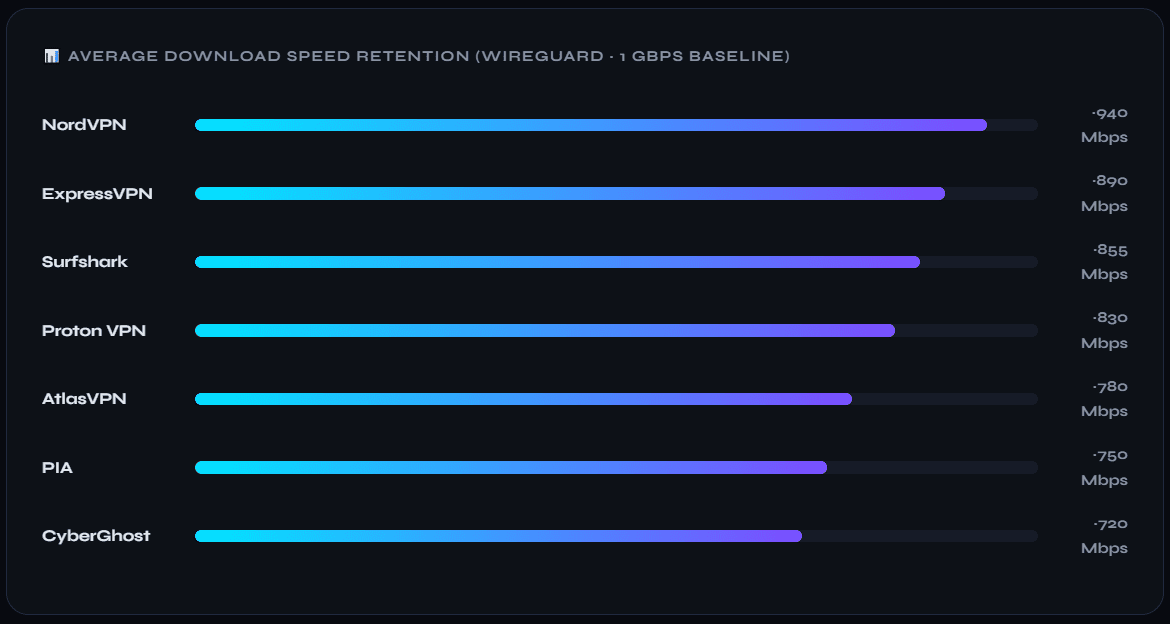
Speed comparisons between VPN protocols depend heavily on server location and ISP. But there are a few consistent patterns worth knowing.
DPI Bypass Rate
Tested across high-restriction networks vs ~60% for standard WireGuard
Latency Overhead
VLESS adds minimal overhead compared to +25–40ms for OpenVPN
Reconnection Time
Reality auto-negotiates on drop; no manual reconnect needed
Detection Resistance
TLS fingerprint mimics real domains — looks identical to HTTPS traffic
The reason Paper VPN holds up where others fail comes down to one thing: it doesn’t fight the firewall, it blends through it. Standard protocols try to encrypt strongly and hope the firewall doesn’t notice. Reality makes the connection structurally identical to a trusted HTTPS session — firewalls aren’t just fooled, they’re given no reason to look twice.
Stability is the other win. Because the connection pattern looks organic, it doesn’t trigger rate-limiting or sudden blocks the way typical VPN traffic can. Sessions stay alive longer and drop less often. If you’ve been frustrated by VPNs that work fine for a week then suddenly stop, this architecture is the answer.