A full look at PlanPlanGo app: the AI-powered travel app built to replace the chaos of spreadsheets, scattered screenshots, and group chats that go nowhere.
I once spent three weeks coordinating a trip to Portugal with four friends. By departure day, our plans lived across two Google Docs, a shared Notes folder no one could edit, a Slack thread with 300 messages, and a camera roll labeled “Lisbon??” We still showed up to a restaurant that was closed on Mondays. The host gave us a look that said he’d seen this before. He had.
That experience is embarrassingly common. Most people plan trips the same fragmented way: one person researches flights, another saves Instagram posts, a third has strong opinions about restaurants but hasn’t looked at a map. By the time you’re at the airport, you have seven different versions of the itinerary, and no one is sure which one is real.
The problem isn’t effort. It’s that there’s no center of gravity. No single place where the whole trip lives. And when you’re trying to decide whether it makes more sense to spend three days in Rome or push further south to Naples or figure out the best places to visit in April before the summer crowds arrive, the last thing you need is to be reconciling four different documents while someone’s texting you asking what time the train leaves.
PlanPlanGo travel planner app is built to fix that. Not by being yet another place to dump links, but by acting as the one system your entire trip runs through, from the first saved idea to the last day on the ground. Here’s a close look at how this AI trip planner actually works.
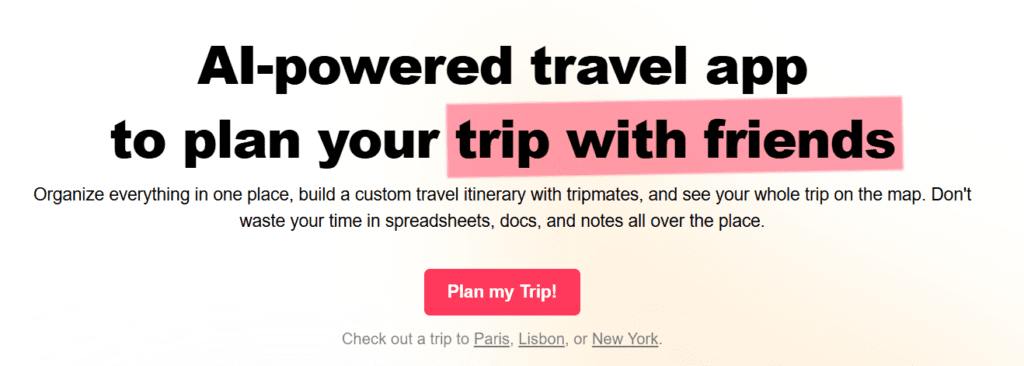
What PlanPlanGo Route PLanner App Actually Does
Travel planning apps can be complicated. Before getting into how the pieces fit together, here’s a plain-language breakdown of every major feature and what it does for you in practice.
| Feature | What It Actually Does |
|---|---|
| Atlas AI Assistant | Builds day-by-day itineraries around your interests, walk preferences, and daily pace |
| Reservation Import | Forward confirmation emails; Atlas auto-adds hotels, flights, and restaurants |
| Closure Alerts | Flags places that are closed at your scheduled time, before you get there |
| Customized Map View | Filter by day, list, or visited status; see your entire route at a glance |
| Tripmate Collaboration | Everyone joins the trip, adds ideas, and Atlas balances each person’s preferences |
| Route Optimization | Atlas adds routes between stops automatically and suggests smarter sequences |
| Notes | Attach notes to the whole trip, individual days, specific places, or lists |
| Traveler Profile | Set interests, walking limits, and daily pace so Atlas tailors every suggestion |
| Calendar Export | Push the full itinerary to Google or Apple Calendar with addresses and travel time |
| Today View | Mark places visited as you go; see what’s left and find nearby saved spots |
PlanPlanGo Vacation Trip Planner Keeps Everything in One Place
Picture this: you’ve been dreaming about Tokyo for months. You’ve got a folder of bookmarks, a note in your phone titled “Japan??”, three Reddit threads open in your browser, and a friend who keeps sending you ramen spots at midnight. None of it is connected. None of it knows about the rest.
PlanPlanGo changes that the moment you start a trip. Every attraction, hotel, restaurant, flight, and half-formed idea goes into one shared trip itinerary planner. You attach notes to anything. You see all of it on a live map. That folder of Tokyo bookmarks? All pins, clustered by neighborhood. You immediately see that six of your most-wanted spots are all within walking distance of each other in Shinjuku, and your hotel is inexplicably on the other side of the city. Now you know. Now you can fix it before you’re standing on a corner at 11pm jet-lagged and confused.
The map isn’t static either. You can filter it by day, by a specific list, or by what’s left unvisited. Planning out the best places to visit in October, when foliage is peaking in Kyoto and the crowds in Rome have finally thinned? You can build separate lists by destination and see them all clearly, no tab-switching required.
Meet Atlas AI Travel Assistant
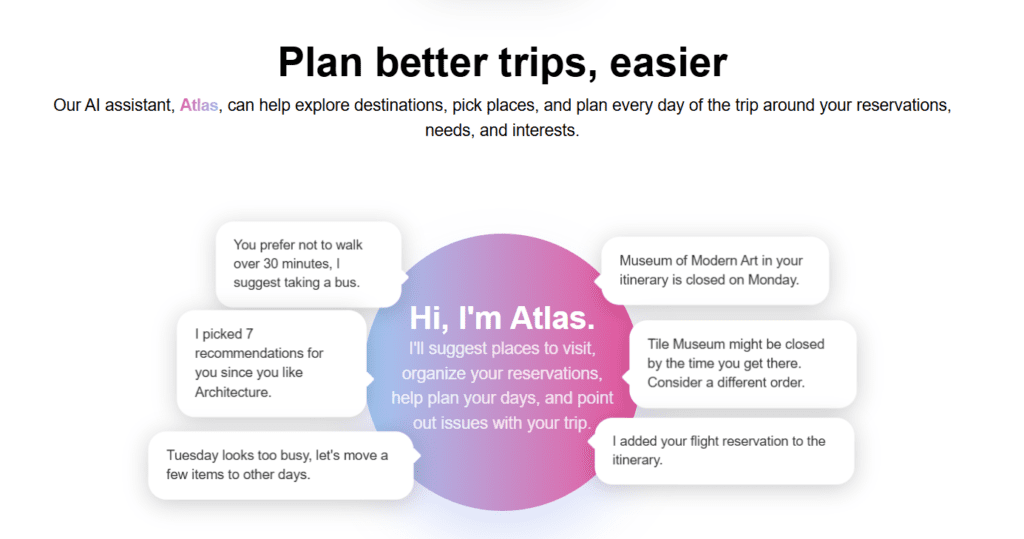
Most AI tools will tell you what’s popular. Atlas tells you what’s right for you, specifically, given how you travel, how far you’ll walk, and how much you want to pack into a day.
You set up your Traveler Profile first. You tell Atlas your interests, whether that’s architecture, food markets, nightlife, outdoor trails, or some combination. You tell it your walking limit. You tell it whether you like your days tightly scheduled or loose enough to wander. Then, once you’ve added places and forwarded your reservations, Atlas takes all of it and builds a day-by-day itinerary. Not a generic one. One that reflects your actual preferences and the actual opening hours of the places you’ve saved.
It also watches for problems you wouldn’t catch on your own. If you’re planning a winter trip and looking at the best places to visit in December, Atlas will notice if a museum on your list is closed for the holiday weekend, or if you’ve scheduled three major sights on the same afternoon and won’t realistically make it to all of them. Here’s what Atlas will actually surface in real time:
- “You prefer not to walk over 30 minutes. I suggest taking a bus.”
- “I picked 7 recommendations for you since you like Architecture.”
- “Museum of Modern Art in your itinerary is closed on Monday. Consider other best art galleries in Europe.”
- “Tile Museum might be closed by the time you get there. Look at a different order.”
- “Tuesday looks too busy. Let’s move a few items to other days.”
- “I added your flight reservation to the 2 days in Paris itinerary.”
These aren’t generic nudges. They’re specific interventions based on your actual schedule, your stated preferences, and the real-world hours of the places you’ve saved.
Forward Your Confirmations, Skip the Data Entry
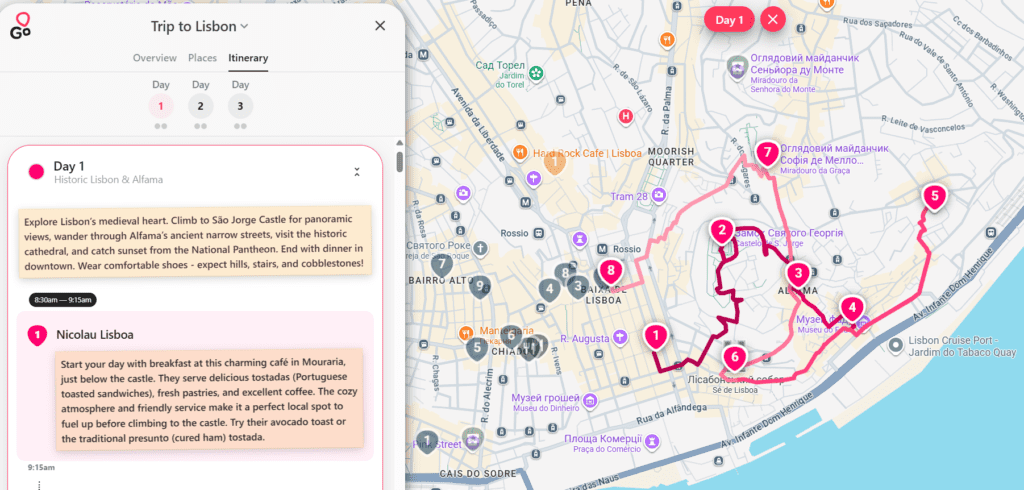
Here’s a ritual most travelers know well. You book a flight on one site, a hotel on another, a restaurant through a third app. You get three confirmation emails. At some point, probably the night before departure, you try to piece it all together into something coherent. You copy times into a doc, get one wrong, and spend twenty minutes on a Tuesday morning at the airport wondering if your check-in is at 2pm or 3pm.
PlanPlanGo app for travel planning removes that entirely. Forward your confirmation emails to the app and Atlas reads them, pulls the relevant details, and adds your hotels, flights, and restaurant bookings into your itinerary at the correct times. Whether you’re doing a 3-day Paris itinerary or a month-long backpacking route through Southeast Asia, your reservations just appear, connected to the right days, no manual entry required.
This is one of those features that sounds modest until you’ve used it. Then it becomes non-negotiable.
Closure Alerts: The Feature You Didn’t Know You Needed
There’s a specific kind of travel disappointment that comes from arriving somewhere and finding a sign on the door. Closed for renovation. Closed Mondays. Closed for a private event you couldn’t have anticipated. It’s not a disaster, but it costs you an hour, a detour, and a little bit of morale.
PlanPlanGo has a quiet fix for this. Closure alerts check whether the places you’ve scheduled are actually open at the time you’ve planned to be there. If you’ve built out a 3-day London itinerary and one of your museums is closed on the day you’ve scheduled it, Atlas flags it before you go, not when you’re standing at the entrance. If you’re running behind schedule and won’t make it to a gallery before it closes, it catches that too.
It’s the kind of thing a well-traveled friend who’d been to London ten times would think to mention. Atlas just happens to be that friend for every destination.
How PlanPlanGo Handles Both Solo and Group Travels
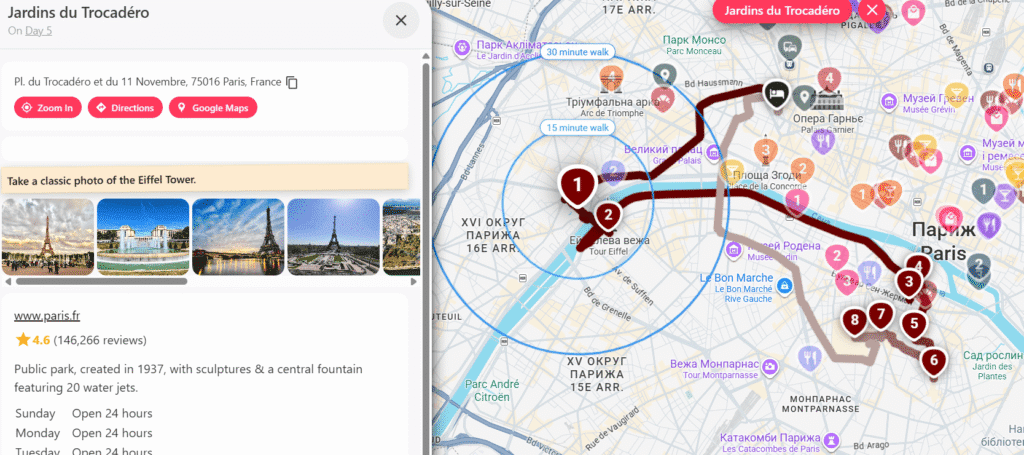
Some trips are solo. Some involve six people with six different opinions about where to eat dinner, and one person who still hasn’t booked their flight two weeks out. PlanPlanGo travel planning app handles both, but the experience shifts meaningfully depending on who’s coming. Here’s how the key features play out across both scenarios.
| Planning Task | Solo Traveler | Group Travel |
|---|---|---|
| Itinerary building | Atlas builds around your profile | Atlas merges every tripmate’s preferences |
| Adding places | Save to your trip collection | All tripmates contribute to shared lists |
| Reservations | Forward emails, Atlas imports them | Any tripmate can forward confirmations |
| Map view | Filter by day or list | Everyone sees the same live map |
| Route optimization | Atlas optimizes your personal route | Atlas balances stops across the group |
| Notes | Add to any place, day, or list | Shared notes visible to all tripmates |
| Calendar export | Export to your personal calendar | Each person exports to their own calendar |
For solo travelers, PlanPlanGo free AI trip planner is essentially a very attentive personal planner. You say you’re interested in Art Nouveau architecture and want no more than two major sights per morning, and Atlas builds around that. It finds the best places to visit in May when the weather in Barcelona is warm but not punishing, and it sequences your days so you’re not criss-crossing the city unnecessarily.
For groups, it does something harder. When everyone joins as a tripmate and fills out their own profile, Atlas doesn’t just average out the preferences. It holds each person’s input individually and weighs it when organizing each day. If one person wants street food and another wants design museums, both show up in the recommendations. Nobody gets steamrolled. Nobody sends a passive-aggressive message about how the trip felt like someone else’s.
It’s also just practically useful for families. A parent planning the best places to visit in June with kids who have wildly different stamina for walking gets a very different itinerary than a couple doing the same destination. Atlas knows the difference because you told it.
Route Optimization and the Day-Of Experience

Bad routing is one of the most invisible travel mistakes. You don’t realize you’ve done it until you’re on your third subway transfer of the day, sweating, carrying a bag you probably should have left at the hotel, heading somewhere you could have hit this morning when you were already nearby.
As you build your itinerary, Atlas automatically adds routes between places and surfaces optimizations. It spots the inefficiencies. If you’re visiting Amsterdam and you’ve packed three canal-side museums into one afternoon in the wrong order, Atlas suggests a better sequence. If you’re plotting an Amsterdam 3-day itinerary and Tuesday has a time overlap that means you’ll miss your boat tour, it flags it.
Once you’re actually traveling, the app shifts into something closer to a live companion. You mark places as visited as you go, keeping your daily view clean and current. You can pull up directions to your next stop without digging through notes. And if a two-hour queue appears out of nowhere, you can see what other saved places are near you right now and pivot without losing time.
Calendar Export: For the Planners Who Need Everything Synced
Not everyone lives in the app during a trip. Some people need everything synced to a calendar they already use. When your itinerary is finalized, you can export the whole thing to Google Calendar or Apple Calendar, complete with addresses, estimated travel time between stops, and direct links to each place.
Whether you’re locking in a 5-day Tokyo itinerary for a solo adventure or coordinating a family trip where three different people need to see the same schedule in three different apps, the export puts everything where people will actually look. It’s also useful for the person in the group who refuses to download another app but still needs to know where to be at 10am.
The Best AI Trip Planners in 2026, Compared
For this comparison, I looked at the tools that come up most often when people search for an AI trip planner: PlanPlanGo, Layla, Wanderboat, Vacay, and Wonderplan. Each has a different approach to the same problem, and the differences matter depending on how you travel.
PlanPlanGo
PlanPlanGo is the most complete AI trip planner currently available for travelers who want a single system that handles everything from initial idea to the last day on the ground.
The core of it is Atlas, a built-in AI assistant that builds day-by-day itineraries around your actual preferences. You set up a traveler profile with your interests, how far you’re willing to walk, and how packed you like your days. Atlas uses all of that, plus your real reservations, to build something that actually reflects how you travel.
What sets PlanPlanGo apart from every other tool on this list is depth. Forward a hotel confirmation email and Atlas adds it to the right day automatically. Schedule a museum visit and Atlas checks whether it’s open at that time and alerts you if it isn’t. Pack too much into a Tuesday and Atlas tells you before you’re standing somewhere exhausted at 4pm realizing you’ve missed half your list.
The map view is genuinely useful in a way most competitors haven’t matched. Every saved place appears as a pin. You can filter by day, by list, or by what you’ve already visited. Routing between stops is added automatically. For anyone planning a multi-city trip itinerary or a road trip with fifteen stops, this alone saves hours.
Group travel is where PlanPlanGo pulls furthest ahead. Every tripmate joins the trip, fills out their own profile, and Atlas builds itineraries that account for each person’s preferences individually, not as an average. Everyone sees the same live map. Everyone can contribute. Nobody has to be the full-time trip manager.
The calendar export, closure alerts, notes system, and Today View for live travel round out a tool that works at every stage of the trip, not just the planning phase.
Best for: Solo travelers, group trips, families, road trips, multi-city itineraries, anyone who wants one system for the whole trip.
Weakness: Doesn’t book flights or hotels directly. You still need to use booking sites, then forward the confirmations to PlanPlanGo.
Layla
Layla is a conversational AI travel assistant built around a chat interface. You describe what you want and Layla responds with suggestions, much like asking a knowledgeable friend for recommendations.
It’s good at the discovery phase. Ask Layla about the best places to visit in April in southern Europe and it’ll give you a useful, specific answer. Ask it to recommend neighborhoods in Barcelona and it does that well too.
Where it falls short is structure. Layla is primarily a recommendation engine, not a full planning system. It doesn’t import your reservations. It doesn’t check whether places are open when you’ve scheduled them. It doesn’t have a map view that shows your trip spatially. What you get from Layla is a good starting point, but you’ll need to take those suggestions and build them into a real itinerary somewhere else.
Best for: Early research and destination discovery.
Weakness: Doesn’t function as a complete trip planner. More of a starting point than a full system.
Wanderboat
Wanderboat generates itineraries quickly based on your destination and travel dates. The output is clean and readable, and for straightforward trips to well-documented cities, the suggestions are reasonable.
The experience is closer to a smart template than a personalized plan. Wanderboat doesn’t ask much about how you travel before generating an itinerary, which means two people with completely different travel styles planning a trip to Rome will get roughly the same output. It also lacks real-time alerts, reservation importing, and group collaboration features.
For a solo traveler doing a quick 3-day Rome itinerary who just wants a starting framework, Wanderboat is decent. For anything more complex, it runs out of capability quickly.
Best for: Simple solo trips to popular destinations where a generic framework is enough to get started.
Weakness: Limited personalization, no reservation management, no group features.
Vacay
Vacay is a chatbot-based planner that generates trip suggestions through conversation. It’s accessible and easy to use, with a low barrier to entry. You can have a basic itinerary in a few minutes.
The suggestions are surface-level for most destinations. Vacay tends to recommend the obvious choices, the same top-ten sights that appear on every travel blog, without much ability to dig into neighborhoods, off-season timing, or traveler-specific preferences. It also doesn’t maintain a live itinerary you can update, share, or take with you on the trip itself.
It works as a quick brainstorm tool. It doesn’t work as a trip planning system.
Best for: Quick destination brainstorming when you don’t know where to start.
Weakness: Shallow recommendations, no live itinerary, no collaboration, not useful during the trip itself.
Wonderplan
Wonderplan generates structured itineraries with a cleaner interface than some competitors. It asks a few questions upfront about your travel style and budget, which gives it slightly more personalization than tools that skip that step entirely.
The day-by-day output is readable and reasonably well-paced. Wonderplan handles popular destinations like Tokyo, London, and Paris with more competence than generic tools. The budget-awareness is a genuine differentiator for cost-conscious travelers.
Where it struggles is anything beyond the initial plan. There’s no reservation importing, no closure alerts, no map-based view, and no group collaboration. Once it generates your itinerary, it largely hands you a document and steps back. The AI trip planner with budget tracking angle is useful, but it doesn’t go deep enough to replace a real budgeting tool.
Best for: Budget-conscious travelers who want a structured starting itinerary.
Weakness: Limited functionality after the initial plan is generated. No live features for use during travel.
| Feature | PlanPlanGo | Layla | Wanderboat | Vacay | Wonderplan |
|---|---|---|---|---|---|
| Personalized itinerary building | Yes | Partial | Basic | Basic | Partial |
| Reservation import via email | Yes | No | No | No | No |
| Live map view | Yes | No | No | No | No |
| Closure alerts | Yes | No | No | No | No |
| Group collaboration | Yes | No | No | No | No |
| Route optimization | Yes | No | No | No | No |
| Budget awareness | Partial | No | No | No | Yes |
| Calendar export | Yes | No | No | No | No |
| Useful during travel | Yes | No | No | No | No |
| Free to start | Yes | Yes | Yes | Yes | Yes |
How PlanPlanGo Stacks Up Against Other AI Trip Planners
I’ve tried most of the tools that come up when you search for the best AI trip planner. Layla is good for early-stage inspiration, the kind of tool you use when you’re still deciding between Lisbon and Barcelona. Wanderboat generates a clean itinerary quickly but doesn’t ask much about how you actually travel, so two people with completely different styles planning the same Rome trip get roughly the same output. Vacay is fine for a quick brainstorm. Wonderplan has some budget awareness that’s genuinely useful if cost is your primary constraint.
None of them go the distance.
What I kept running into with every other tool was the same wall: they help you start planning, then hand you a document and step back. There’s no reservation importing, no closure alerts, no live map, no group collaboration, no route optimization. You get a list of suggestions and then you’re on your own to actually build a trip out of it.
PlanPlanGo is the only AI-powered trip planner I’ve used that stays useful from the first saved idea all the way through the last afternoon of the trip. The others are research tools. PlanPlanGo is a planning system. That’s a meaningful difference when you’re standing in Tokyo at 11am realizing your museum is closed on Wednesdays and you need to figure out what to do instead.
The Honest Picture
PlanPlanGo trip planner map app won’t book your flights or negotiate hotel rates. What it will do is take everything you’ve already found, everything your group has contributed, and every reservation you’ve made, and turn it into a coherent, living plan that actually holds together. One map. One itinerary. One AI watching for problems while you focus on being excited about the trip.
The spreadsheet approach works until it doesn’t. Usually that’s day two, when someone realizes their version of “flexible” and yours are completely different. Having one shared system removes most of that friction before it starts. If you’re looking for the best AI trip planner app that handles both the big picture and the small details, start your next trip in PlanPlanGo and you’ll probably close a few browser tabs you forgot you had open.